Parsing PDF to text using PowerShell There are times when you come and you find some Important PDF file (Something like a low level design or something similar), The point is I really hate PDF files... I was googling a way which i can use to read PDF files using PowerShell, this can be helpful of you have a lots of PDF files and you want to filter these PDF's based on certain word or a string (Using a regex or something similar to do that). I know i was talking too much so let cut to the chase : I found this amazing .NET library which you can use to parse a PDF file(Convert it into a text). The library is called "ITextSharp", here you can fidn some information about it : http://sourceforge.net/projects/itextsharp/?source=typ_redirect I assume that you already know what the hell I am talking about so, This is the code which i got from from Stack Overflow : http://stackoverflow.com/questions/15684699/how-to-parse-pdf-content-to-database-with-pow...
Popular posts from this blog
Monitoring your servers using powershell
There were sometimes in my work life were I had to do things my own way and there was no help from anyone.... I created this script 2 years ago to monitor all my windows servers. This script is divided into PowerShell functions. Each function can monitor a certain resource in your server. Take a look: ### Script starts here Function Ping-server { param([string]$ServerName) $pingsrv = Test-Connection -ComputerName $ServerName if ($pingsrv){Write-Host "server " $ServerName "is reachable.."}else {Write-Host "server " $ServerName " is not reachable!!!!, please chack..."} } function get-volsize { param([string]$ServerName) $getvols = Get-WmiObject -Class CIM_LogicalDisk -ComputerName $ServerName | where {$_.DriveType -eq "3"} foreach ($rr in $getvols) { $devid = $rr.DeviceID $VolName = $rr.VolumeName $DriveFullsp = $rr.Size $DriveFresp = $rr.FreeSpace $UsedSpace = $DriveFullsp - $DriveFresp $PercentFree =($DriveFr...
Use Secure password in your powershell code without a prompt
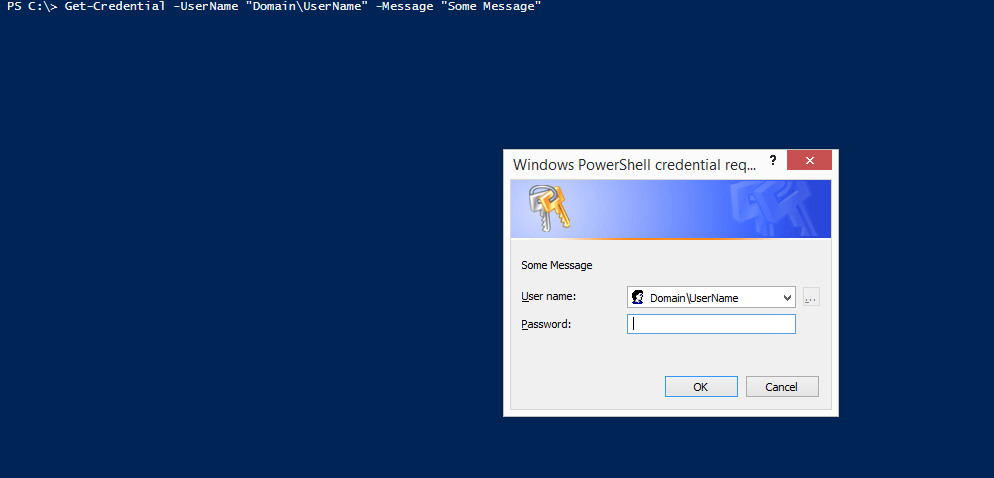
Use Secure password in your powershell code without a prompt - Yesterday i was running a script where i had to type my credentials(Username and password) to get the mandatory results from it, now Normally if you want to use your credentials with one time prompt that will take your information and apply it where ever it is required, you can use somthing like this : you can notice in that when you type : Get-Credential -UserName "Domain\UserName" -Message "Some Message" that you will get a prompt asking you for your password, once you put the password this credential can be use any where in the code when it's required, of course you can assign the CMDLET to a variable and you can use this variable anywhere you want, for example: $cer = Get-Credential -UserName "Domain\UserName" -Message "Some Message" now this is great if i am running a code every time by myself, but what if i want to schedule some code, and this code needs my ...
[XN Betting] - XN Affiliate Casino
ReplyDeleteXN Betting. 샌즈카지노 XN Esports offers 메리트카지노총판 an amazing platform that offers the best live betting experience available 바카라 사이트 in the most attractive, rewarding and entertaining